

Printing workflow software is the production technology that automates every stage of a print job, from file intake and preflight through color management, imposition, and final output routing. For print-on-demand businesses and garment printers, this category of software, formally called prepress and print production management software, is the difference between a shop that scales and one that drowns in manual file handling. Platforms like Fiery JobFlow Pro, Atomyx, and Pythias Fulfillment Cloud each address a different slice of this problem, but all share the same core goal: remove the human bottleneck from repetitive production tasks.
What are the core functions of printing workflow software?
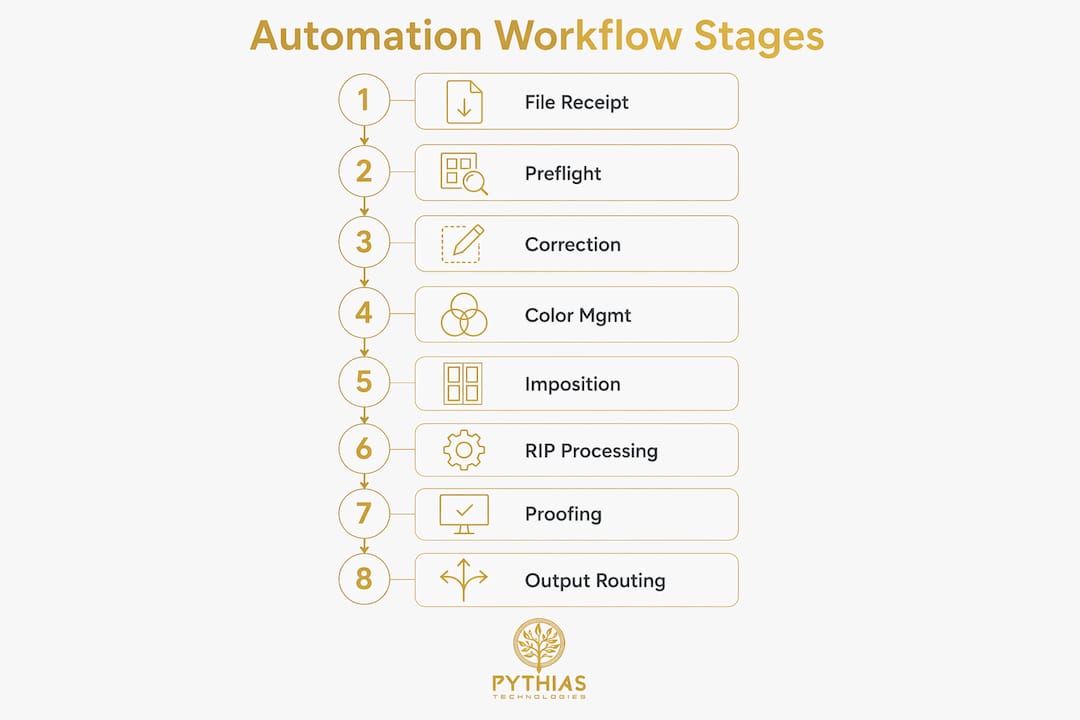
Printing workflow automation involves 8 core stages that compress manual prepress work from hours to minutes. Each stage hands off automatically to the next, cutting the need for operator intervention at every step.
| Workflow stage | Manual process | Automated process |
|---|---|---|
| File receipt | Email or FTP check every hour | Instant ingestion via API or upload portal |
| Preflight | Manual check in Acrobat | Automated rules engine flags errors instantly |
| File correction | Designer fixes and resubmits | Auto-fix for bleed, resolution, color profile |
| Color management | Operator applies profiles manually | ICC profiles applied by job type automatically |
| Imposition | Manual layout in software | Template-based auto-imposition by sheet size |
| Proofing | Email PDF to customer, wait | Instant soft proof with approval link |
| Output generation | Operator sends to RIP | Auto-queue to correct printer and RIP |
| Routing | Manual job ticket and handoff | Barcode or sensor-triggered routing to press |

The table shows a pattern that holds across every shop size: automation does not just save time at one step. It removes the error risk at every handoff. A missed bleed caught at preflight costs nothing. The same error caught after printing costs material, time, and a reprint.
Pro Tip: Set your automated preflight rules to match your most common job types first. Trying to automate every edge case on day one creates more exceptions than it solves.
How does printing workflow software benefit POD and garment printers?
Small and mid-size print shops gain disproportionately from workflow automation because manual file management and proofing tasks consume a larger share of their total labor. A large enterprise can absorb a prepress team. A 5-person DTG or DTF shop cannot.
The operational benefits for POD and garment printers are specific and measurable:
- Reduced file handling labor. Automated preflight and correction eliminate the back-and-forth between operator and customer for common file errors.
- Faster turnaround times. Jobs move from order received to press-ready without waiting for a human to open a queue.
- Consistent output quality. Color profiles and imposition templates apply the same way every time, regardless of who is working the shift.
- Margin protection. A unified workflow platform cuts machine downtime and material waste by 20–30% in digital print environments. That reduction goes directly to the bottom line.
- Scalability without proportional headcount growth. A shop running automated production scheduling can handle twice the order volume without hiring a second prepress operator.
“Workflow automation is not just for big printers. Smaller shops benefit significantly by reducing manual file management overhead, which frees operators to focus on quality control and customer service rather than file babysitting.”
The garment printing context adds one more layer. DTF and DTG jobs often involve customer-uploaded artwork with wildly inconsistent file quality. An automated preflight that catches low-resolution images, missing bleed, or wrong color mode before the job hits the queue prevents the most common reprint causes in custom apparel production. Pythias Fulfillment Cloud addresses this directly by connecting order management, production scheduling, and barcode-triggered routing into a single production environment for print shops and apparel decorators.
What should print shop owners consider when choosing printing workflow software?
The most common mistake print shop owners make is buying print production management software before auditing their current job mix. The right platform depends entirely on what types of jobs you run, how they arrive, and where they go after production.
Key criteria to evaluate before selecting a platform:
- Integration with existing systems. Does the software connect to your MIS, ERP, web-to-print storefront, or e-commerce channels? A platform that sits in isolation creates a new manual step at every boundary.
- Support for two production lanes. Successful shops segment standard versus custom workflows rather than forcing all jobs through a single rigid process. Look for software that lets you define separate rules for repeat catalog jobs and one-off custom orders.
- File format standards. Does the platform enforce PDF/X or other standardized formats at intake? This matters more than most buyers realize.
- Cloud versus on-premise deployment. Cloud platforms update automatically and scale with order volume. On-premise systems give more control but require internal IT resources to maintain.
- Equipment compatibility. Confirm the software integrates with your specific printers, RIPs, and finishing equipment before signing a contract.
Pro Tip: Before evaluating any vendor, map your top 10 job types by volume. Identify which steps are manual today. That list becomes your automation requirements checklist, and it prevents you from buying features you will never use.
Viewing workflow software as a production strategy rather than an IT purchase is the mindset shift that separates shops that succeed with automation from those that stall. The software does not fix a broken process. It accelerates whatever process you already have, good or bad. Audit first, then automate. You can also review a garment printer software checklist to confirm you are evaluating the right capabilities for your specific operation.
How do leading printing workflow platforms compare?
Three platforms represent distinct approaches to print production management, and understanding their differences helps you match a solution to your actual production model.
| Platform | Core strength | Best fit | Key integration |
|---|---|---|---|
| Atomyx | API-first order routing and file processing | Web-to-print and multi-site operations | MIS, ERP, web-to-print systems |
| Fiery JobFlow Pro | AI-assisted job analysis and routing | High-volume digital print environments | Fiery DFEs, barcodes, sensors |
| Expivi | Design-to-print file generation | POD product customization at scale | Product configurators, e-commerce |
| Pythias Fulfillment Cloud | End-to-end production and fulfillment OS | Print shops, DTF/DTG, embroidery, apparel | Shopify, Etsy, Amazon, shipping carriers |
Atomyx is an API-first cloud platform that connects web-to-print storefronts, MIS and ERP systems, and production equipment into one automated order flow. It processes incoming files, runs preflight and correction, and delivers press-ready output securely. Its strength is connectivity: it acts as the central router between systems that would otherwise require manual handoffs.
Fiery JobFlow Pro uses AI-assisted automation to analyze job content and apply the correct processing rules and routing without operator input. It integrates with Fiery digital front ends, barcodes, and external sensors for real-time job tracking. This platform suits high-volume environments where job variety is high and manual routing would create constant bottlenecks.
Expivi automates product customization and print-ready file generation for on-demand printing. It combines a product configurator with instant file output, which removes the design-to-production gap that slows most POD operations. For shops selling configurable products on Shopify or Etsy, this kind of design-to-print integration eliminates a manual step that otherwise requires a designer to touch every order.
Pythias Fulfillment Cloud takes a broader approach. Rather than focusing on prepress alone, it covers the full production and fulfillment cycle: production scheduling, inventory tracking, barcode scanning, shipping label generation, and order management. For print-on-demand fulfillment automation, it connects directly to Shopify, Etsy, Amazon, Walmart, and other sales channels, routing orders automatically to the correct production queue.
How can print shops implement workflow automation successfully?
Successful implementation follows a specific sequence. Shops that skip steps in this sequence spend months troubleshooting problems that were preventable.
- Audit job profiles first. Categorize your current jobs by type, volume, and complexity. Identify which jobs are truly repeatable and which require custom handling every time.
- Standardize file formats before deploying automation. Lights-out automation requires standardized file formats like PDF/X and consistent naming conventions before software deployment. Poor data hygiene creates more manual interventions downstream, not fewer.
- Start with one workflow lane. Automate your highest-volume, most consistent job type first. Prove the system works, then expand to other job types incrementally.
- Train staff on the exception process, not just the automation. Operators need to know what to do when a job falls outside the automated rules. Exception handling is where most automation projects break down.
- Monitor queue data weekly for the first 90 days. Track how many jobs complete without manual intervention. That number tells you whether your rules are calibrated correctly.
Pro Tip: Pair your automation rollout with a file submission guide for customers. Customers who submit correct files reduce your preflight exception rate dramatically, which is where most of the real time savings come from.
The role of print station automation in a modern shop goes beyond software. It requires aligning your equipment, your file standards, your staff training, and your customer communication into a single production system. Software is the engine, but the process design is the fuel.
Key takeaways
Printing workflow software delivers the greatest return when shops audit their job mix first, standardize file inputs, and adopt automation incrementally rather than all at once.
| Point | Details |
|---|---|
| Automation covers 8 core stages | From file receipt to output routing, each stage can be automated to cut prepress time from hours to minutes. |
| Small shops benefit most | Smaller DTF, DTG, and POD operations reduce manual overhead proportionally more than large enterprises. |
| Segment standard vs. custom jobs | Define separate workflow rules for repeat catalog jobs and one-off custom orders to avoid bottlenecks. |
| Standardize files before automating | PDF/X formats and consistent naming conventions are required before lights-out automation can work reliably. |
| Platform fit depends on production model | Atomyx suits multi-system connectivity, Fiery JobFlow Pro suits AI-driven routing, and Pythias Fulfillment Cloud covers end-to-end POD fulfillment. |
What I have learned from watching shops automate production
— Michael Thero
The shops that get the most out of workflow automation are not the ones with the biggest budgets. They are the ones that treat the software rollout as a production redesign project, not a software installation. I have watched well-funded shops buy Fiery JobFlow Pro or Atomyx and then struggle for six months because they automated a broken process. The software ran perfectly. The process was the problem.
The shops that succeed start smaller. They pick one job type, map every manual step, eliminate the unnecessary ones, and then automate what remains. That approach sounds slow, but it produces results in weeks rather than months. And the results compound. Once operators trust the automated queue, they stop second-guessing it. Job throughput increases. Reprint rates drop. The shop can take on more orders without adding headcount.
The other thing I would push back on is the assumption that automation is a destination. The best-run print shops I have seen treat their workflow software as a living system. They review queue exception reports monthly, adjust preflight rules when new job types appear, and update routing logic when they add equipment. Automation is not something you set and forget. It is something you tune continuously, and the shops that do that consistently are the ones still growing five years later.
— Michael Thero
How Pythias Technologies automates your print production
Pythias Technologies builds production software specifically for print shops, DTF and DTG businesses, embroidery companies, and apparel decorators. Pythias Fulfillment Cloud functions as the production operating system for your shop: it manages order queues, production scheduling, barcode scanning, inventory tracking, and shipping label generation in one connected platform. Orders from Shopify, Etsy, Amazon, and Walmart route automatically to the correct production queue without manual intervention. Pythias Commerce Cloud extends that reach by syncing product catalogs and inventory across 18+ marketplaces from a single dashboard. If you are ready to move from manual file handling to a fully connected print-on-demand automation platform, Pythias Technologies is built for exactly that transition.
FAQ
What is printing workflow software?
Printing workflow software is a production management system that automates the stages of a print job from file intake through preflight, color management, imposition, and output routing. It reduces manual operator intervention and improves consistency across every job.
How many stages does an automated print workflow cover?
A complete automated print workflow covers 8 core stages: file receipt, preflight, correction, color management, imposition, proofing, output generation, and routing. Each stage hands off automatically to the next, compressing prepress work from hours to minutes.
Is workflow automation worth it for small print shops?
Small and mid-size print shops gain disproportionately from workflow automation because manual file handling consumes a larger share of their total labor. Automating even the preflight and routing stages frees operators for quality control and customer service.
What is the difference between Atomyx and Fiery JobFlow Pro?
Atomyx is an API-first platform focused on connecting web-to-print, MIS, and ERP systems into one automated order flow. Fiery JobFlow Pro uses AI-assisted job content analysis to apply processing rules and routing automatically within Fiery-based digital print environments.
What should I do before deploying printing workflow software?
Standardize your file formats, such as PDF/X, and establish consistent naming conventions before deploying any automation. Poor file hygiene upstream creates manual interventions downstream and negates most of the efficiency gains the software is designed to deliver.
Recommended
- Garment Printer Software Checklist for Print Pros | Pythias Technologies | Pythias Technologies
- Optimize Your Garment Printing Shipping Workflow | Pythias Technologies | Pythias Technologies
- Software for Print on Demand Businesses — Fulfillment Automation | Pythias | Pythias Technologies
- Garment Print Shop Software Setup: 2026 Guide | Pythias Technologies