
Managing DTG printing order management manually is one of the fastest ways to cap your growth. Missed artwork specs, disorganized production queues, and delayed fulfillment don’t just frustrate customers. They eat into margins and make scaling feel impossible. Whether you’re running five orders a day or five hundred, the gap between a profitable shop and a chaotic one usually comes down to how well your order workflow is structured. This guide covers what to set up, how to run it, and where most shops go wrong.
Table of Contents
- Key takeaways
- DTG printing order management prerequisites
- Step-by-step DTG order processing workflow
- Troubleshooting common DTG order challenges
- Scaling DTG operations with best practices
- My take on where most DTG shops go wrong
- How Pythiastechnologies powers your DTG workflow
- FAQ
Key takeaways
| Point | Details |
|---|---|
| Artwork specs matter first | Design files must meet 300 DPI minimum standards before any order enters production. |
| Automation reduces errors | Connecting eCommerce platforms to RIP software cuts manual handling and speeds turnaround significantly. |
| Maintenance prevents downtime | Daily nozzle checks and ink agitation routines protect production capacity and print quality. |
| Hybrid routing saves money | Routing small runs to DTG and volume jobs to screen printing maximizes profitability across order types. |
| Software replaces spreadsheets | Specialized order management software gives you real-time visibility that spreadsheets cannot provide at scale. |
DTG printing order management prerequisites
Before you can optimize your workflow, you need the right foundation in place. Gaps at this stage show up as production errors, not setup problems, so most shops diagnose them too late.
Equipment and technology
Your core hardware stack for direct to garment printing includes:
- DTG printer: Standard machines produce 15 to 30 shirts per hour; industrial systems reach up to 150 impressions per hour on cotton.
- Pretreatment machine: Required for dark garments to bond white ink properly. Inconsistent pretreatment is the most common cause of faded prints.
- Heat press: Used to cure pretreatment and set ink post-print. Temperature accuracy matters here.
- RIP software: Translates artwork files into print-ready data. Most shops use dedicated RIP programs that integrate directly with their DTG printer model.
Order management software and eCommerce integration
Order management software connects your sales channels to your production floor. Without it, orders arrive through email, Etsy messages, Shopify notifications, and manual spreadsheets all at once. That fragmentation is where errors start. A proper order management platform pulls orders from multiple marketplaces into a single queue, assigns SKUs, flags missing information, and routes jobs automatically.
Artwork file standards
Design files for DTG must be prepared at a minimum of 300 DPI, typically PNG format with a transparent background. Low-resolution files that look sharp on a monitor will print soft and pixelated on fabric. Build a file validation step into your intake process so no order moves forward with a non-compliant file.
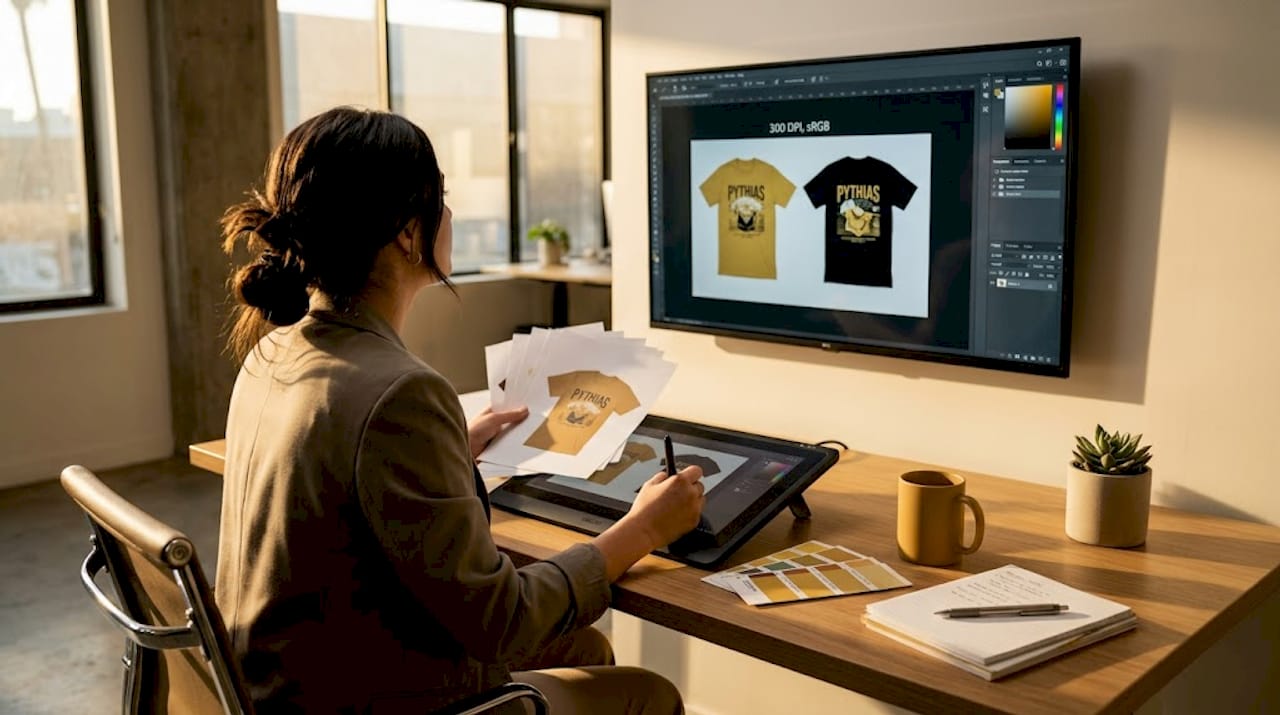
Pro Tip: Create a pre-flight checklist for every incoming artwork file: resolution, color mode (sRGB), file format, and canvas size. Automate this check inside your order intake system wherever possible.
Substrate selection
Using 100% cotton substrates gives you the best ink absorption and color vibrancy. Polyester blends risk dye migration and dull output. Standardize your blank supplier and SKU list so your inventory stays predictable and your print results stay consistent.
| Substrate | DTG Performance | Risk |
|---|---|---|
| 100% cotton | Excellent ink absorption, vibrant color | Minimal |
| 50/50 cotton-poly blend | Acceptable, softer hand feel | Moderate dye migration |
| 100% polyester | Poor ink adhesion, dull output | High dye migration |
Step-by-step DTG order processing workflow
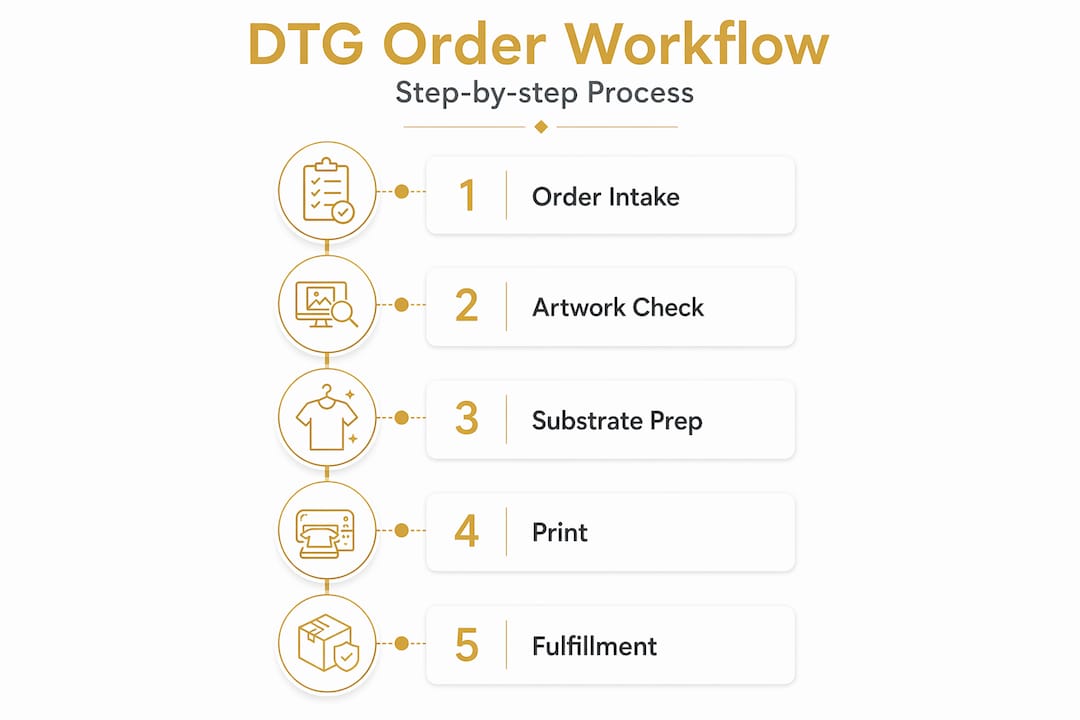
A repeatable workflow is what separates shops that scale from shops that scramble. Here is a practical sequence that works across order volumes.
-
Receive and validate the order. Confirm garment size, color, quantity, and artwork file specs before the order enters the production queue. Flag incomplete orders immediately and contact the customer with a specific list of what’s missing.
-
Route the job automatically. Use your production queue management system to assign the order based on job type, complexity, and machine availability. Small personalized runs go to DTG. High-volume repeatable designs route to screen printing if that capacity exists.
-
Prepare the artwork file. Load the validated file into your RIP software. Set ink limits, color profiles, and print dimensions according to your machine’s specifications. Automated workflows connecting eCommerce platforms directly to RIP software reduce manual file handling and cut operator error significantly.
-
Run daily machine maintenance. Before the first print of the day, complete nozzle checks, wiper cleaning, and white ink agitation. Rigorous daily maintenance routines prevent downtime caused by head clogs and ink issues. Skipping this step on a busy morning is how shops lose two hours to a clogged printhead at noon.
-
Pretreat and print. Apply pretreatment evenly to dark garments and cure it fully before printing. Load the garment flat on the platen with no wrinkles. Print, then cure the ink with the heat press at the correct temperature and dwell time.
-
Quality check and pack. Inspect every print against the approved artwork before packaging. Check for ink coverage, color accuracy, and any smearing. Pack with a packing slip that includes the order number and tracking barcode.
-
Update order status and ship. Mark the order as fulfilled in your order management system. Generate the shipping label, update the customer with tracking information, and close the job in your queue.
Pro Tip: Batch orders by garment color, not just by design. Printing all white and light garments together before switching to dark garments saves pretreatment time and reduces machine reconfiguration between jobs.
Troubleshooting common DTG order challenges
Even well-run shops hit production problems. Knowing where to look first saves time.
Print quality issues almost always trace back to one of three causes: a file that didn’t meet spec, a substrate that wasn’t 100% cotton, or inconsistent pretreatment application. Before blaming the machine, check those three variables in that order.
Ink clogging is the most disruptive production problem in direct to garment printing. White ink settles and thickens when the machine sits idle. Daily agitation and weekly deep-cleaning cycles keep this under control. If a clog occurs mid-production, most RIP software allows you to pause the queue and run a maintenance cycle without losing the job data.
Customer communication gaps create disputes that are entirely avoidable. Written quality control checkpoints, sample proofs, and delivery buffers protect against the most common fulfillment complaints. Send a proof image before printing on orders over a certain dollar threshold. Build a 24-hour buffer into your quoted turnaround time.
“Professional DTG shops implement written QC checkpoints, sample approvals, and delivery buffers to minimize client disputes and protect production schedules.”
Manual data entry errors compound quickly in high-volume environments. A wrong size, a misread color, or a transposed order number costs you a garment and a customer. Barcode scanning at intake and at packing, combined with automated order data pulled from your eCommerce platform, removes most of these failure points. Barcode labeling systems built into your workflow make job tracking accurate from receipt to shipment.
Stock shortages disrupt fulfillment schedules when blank inventory isn’t monitored in real time. Set reorder alerts by SKU and tie your inventory levels to your order intake system so you catch shortfalls before they become delays.
Scaling DTG operations with best practices
Growth in print on demand management requires moving beyond manual processes before you think you need to. Waiting until the system breaks is expensive.
The first transition most shops need to make is from spreadsheets to dedicated order management software. Spreadsheets don’t generate alerts, don’t update in real time, and don’t connect to your printer or your sales channels. They require manual updates, which means they’re always slightly wrong. Specialized platforms give you a live production queue, automated status updates, and reporting that shows where your bottlenecks actually are.
| Management Method | Real-Time Visibility | Error Rate | Scalability |
|---|---|---|---|
| Manual spreadsheets | None | High | Poor |
| Basic eCommerce tools | Limited | Moderate | Limited |
| Dedicated order management software | Full | Low | Strong |
| Integrated automation platform | Complete | Minimal | Excellent |
Hybrid production models route small personalized runs to DTG and high-volume repeatable designs to screen printing. This approach maximizes profitability by matching the production method to the order characteristics. Shops that run only DTG for every job leave money on the table on volume orders.
Cloud-based platforms add another layer of capability for shops with multiple production sites or remote management needs. Real-time tracking across locations, centralized artwork libraries, and shared production queues mean that a manager can monitor throughput and flag delays without being on the floor.
Pro Tip: Track your cost per print against DTG’s market average of $1 to $7 per garment (excluding blanks). If your cost per print is climbing above that range, audit your ink consumption, maintenance frequency, and job routing logic first.
Predictive maintenance scheduling, based on print volume data rather than calendar intervals, keeps machines running longer between service events. Most modern DTG printers log head strike counts and ink usage. Use that data. Automating DTG printing workflows at this level is what separates shops doing $500K a year from shops doing $2M with the same headcount.
My take on where most DTG shops go wrong
I’ve worked with print shop owners at every stage of growth, and the pattern is almost always the same. The shop starts with a single machine, a spreadsheet, and a lot of hustle. Orders come in through three different channels. The owner tracks everything manually because it works well enough at low volume. Then volume doubles, and suddenly “well enough” means two missed orders a week and a customer service problem that takes more time than the printing itself.
What I’ve seen consistently is that manual order management doesn’t just create errors. It actively prevents growth. You can’t take on a wholesale account or a marketplace integration when your intake process requires someone to manually copy order details from an email into a spreadsheet. The labor cost alone makes it unprofitable.
The misconception I hear most often is that DTG can’t scale. That’s not true. What can’t scale is the workflow built around a single operator doing everything by hand. The machine itself, especially at the industrial end, can handle serious volume. The bottleneck is always the process around it.
Hybrid workflows get dismissed by shops that see themselves as “DTG only.” That’s a missed opportunity. Screen printing isn’t a competitor to DTG. It’s a complement. Routing a 500-piece order to screen printing while your DTG machine handles the 12-piece personalized run next to it is how you maximize both assets.
The shops I’ve seen grow fastest are the ones that treat their order management system as seriously as they treat their printer. The machine is the production tool. The software is the business tool. Both need investment.
— Michael
How Pythiastechnologies powers your DTG workflow
Pythiastechnologies is built specifically for print on demand management and DTG order fulfillment operations. The platform connects your sales channels, production queue, and inventory into a single system. No more toggling between Shopify, spreadsheets, and your RIP software.
Key capabilities include:
- Production queue management with automated job routing by order type and volume
- Barcode labeling for accurate job tracking from intake to shipment
- Real-time inventory alerts by SKU to prevent stock-related fulfillment delays
- Multi-marketplace integration across Etsy, Shopify, Amazon, and more
- Design and product management tools that enforce artwork file standards at intake
Explore the full platform features or visit Pythiastechnologies to book a demo and see how the platform fits your current workflow.
FAQ
What is DTG printing order management?
DTG printing order management is the process of receiving, validating, routing, producing, and fulfilling direct to garment print orders through a structured workflow. It covers everything from artwork file intake to shipping confirmation.
What software is best for DTG order processing?
Dedicated order management platforms that integrate with eCommerce channels and RIP software outperform spreadsheets at any meaningful volume. Look for real-time queue visibility, automated routing, and barcode-based job tracking.
How do I reduce errors in DTG order fulfillment?
Automate order data intake from your sales channels to eliminate manual entry, enforce artwork file standards at the point of order, and use barcode scanning at packing. Written QC checkpoints at each production stage catch errors before they reach the customer.
How many shirts can a DTG printer produce per hour?
Standard DTG printers produce 15 to 30 shirts per hour. Industrial systems can reach up to 150 impressions per hour on cotton substrates.
When should I switch from spreadsheets to order management software?
The right time is before your current system breaks. If you’re managing more than 20 to 30 orders per day manually, or if you’re selling across more than one channel, dedicated order management software will pay for itself in reduced errors and saved labor within the first month.